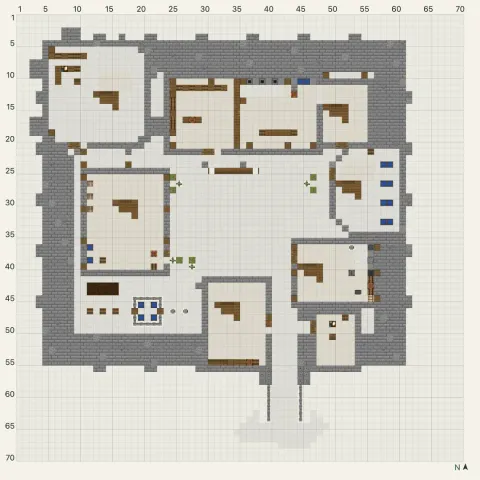
Cliffside Workshop Keep
Hard · 56 layers
Every castle blueprint shows the build one layer at a time on a grid, one square per block, with the size and the full block list. The first floor is free to view on every castle, and each one has numbered steps for the busy parts like battlements and roofs.
1 blueprint
Layer 1 of a castle is its footprint: the outer wall, the gate and the base of every tower. Lay it out first and check each corner against the grid, because the towers and the gatehouse are all measured from that outline. Then go up one layer at a time, and count each tower from its own corner rather than from the wall’s.
Castles are mostly walls, so the block list will be dominated by one or two kinds of stone. Gather those first, in stacks, before you start the first layer. If a layer gets busy around the battlements or the roofs, open the numbered steps for the same castle: the guide marks only the blocks for the current step in red.
Browse castle ideas with photos ›